
Pasko Plan
₱199Christmas & 13th month budget planner
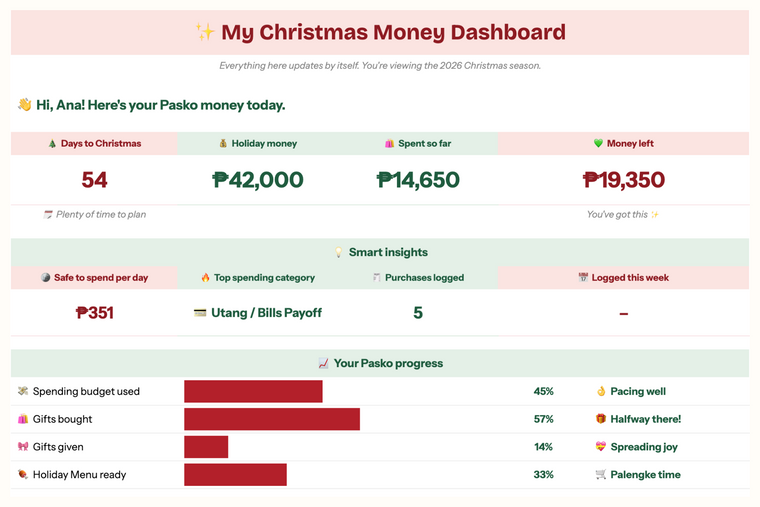

Google Sheets planners for Filipino families
Google Sheets planners for every part of Filipino family life: sahod budgets, ipon, utang, negosyo, Pasko and the big moments. Type your numbers once and your planner does the math.
Shop by need
Pick a shelf. Every planner is a Google Sheet that does the math for you.
Available now
Christmas & 13th month budget planner

Snowball or Avalanche: see which saves you more
Why families plan with us
Built for how Filipino families really spend: sahod, bills, ipon, utang, negosyo and pamasko.
Type your numbers once. Totals, progress and what's left fill in by themselves.
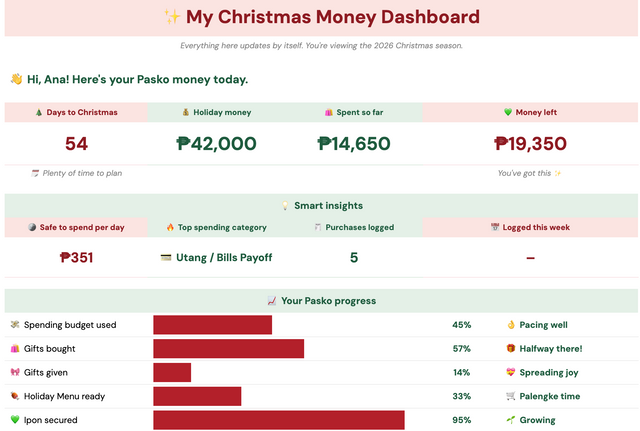
Free Google Sheets on your laptop or the Sheets app. Log a gastos while you're still at the mall.
Pay once, no subscription. Reuse your planners year after year and see your progress side by side.

From one planner to another
I make Google Sheets planners for Filipino families who want to plan every peso, from the monthly sahod to ipon goals, utang and Pasko.
Every planner is tested on real Filipino budgets: real sahod, bills, ipon challenges, pamasko and market runs.
— Alli
How it works
GCash, Maya or bank transfer. No account needed.
Your access link arrives once your payment is confirmed.
Click “Make a copy” and the planner is yours in free Google Sheets.
No. Every planner works in Google Sheets, which is free. You just need a Google account.
Yes, with the free Google Sheets app. A laptop is easiest for the first setup, then your phone is perfect for quick updates.
Pay with GCash, Maya or bank transfer. Once your payment is confirmed, we email you a link to make your own copy in Google Sheets.
Yes. Pay once and the planner is yours to keep. No subscription, no monthly fees.
Yes, as long as you like. Your copy stays in your Google Drive, so you can reuse seasonal planners every year and keep trackers going until you reach your goal.
Yes. Your copy lives in your own Google Drive and only you can see what you type. We never see your numbers.
Free download
Get the Ipon Challenge Tracker free, plus money tips and first dibs on new planners.
No spam. Unsubscribe anytime.